

ROLE
UX/UI Designer
Web Developer
TEAM
Design Team, MES Team, ERP Team, MII Team, PCo Team
TOOL
Figma, FigJam, Miro, Adobe Creative Suite, Jira
DURATION
9 months
IMPACT

70%
System Adoption Rate

4/5
User Satisfaction Score

40%
Routing Error Rate

80%
Successful Deployment Rate
01 - The Challenge

Defining the Routing
The routing is the top level of process modeling, which defines the sequence of operations required to manufacture a product. It’s like a recipe or blueprint that tells the system how to make something, where to do it, and in what order.
Before Central Design Time
The routing planner managed routings within the ERP system. Typically, a routing did not include detailed operational sequences—these were usually hard-coded directly into the PLCs at the shop-floor level. Whenever interactions between machine units were required or when the production environment changed, a technical Engineer had to manually update the PLC code each time.
PAIN POINTS

Disconnected Workflows

Low Visibility

Manual Updates

Engineering Dependency

The Project
This was the challenge behind Central Design Time: how might we bridge the gap between ERP-defined routings and shop-floor execution?
We set out to create a more connected way to model production—bringing routing, machine orchestration, and message flows into one cohesive experience.
Why We Care

Production design shouldn’t stop at the ERP boundary.
CDT gives SAP control from production routing down to the technical configuration of PCo at the machine level, connecting planning, configuration, and execution in one central environment.
By making these system relationships visible and manageable, teams can configure once, reuse models, validate offline, and trace issues across the process—reducing engineering overhead and shortening the path from planning to shop-floor execution.


Research
To apply routings from ERP to the shop floor level interactions involves two main roles: Routing Planner and Technical Engineer:
-
Routing Planners owned defining and managing production routings in the ERP system.
-
Technical Engineers implemented and maintained detailed shop-floor execution logic in PLC systems.


Fragmented ERP-to-Shop-Floor Routing Workflow
RESEARCH STEPS
For this project, I structured my research around users, behaviors, the existing system, and the decisions they needed to make.


What I Learned
KEY INSIGHTS
01 — Production logic is fragmented across people and systems
ERP, PLCs, and machine operations are disconnected, making knowledge sharing and change management dependent on manual communication.
→ Connect production logic across systems in one shared workflow.
02 — Production workflows are difficult to see and validate
Text-based, repetitive workflows make processes hard to understand, reuse, and test before deployment.
→ Make workflows visual, reusable, and testable.
03 — Roles have different needs but share the same process
Heavy reliance on technical engineers creates bottlenecks and limits other users’ ability to configure independently.
→ Enable role-based configuration, validation, and deployment.
THE REAL CHALLENGE
"How might we make complex production logic understandable and actionable across roles—without losing the technical control required by the machines?"
02 - Seeing the System

Map the Complexity
Before redesigning the experience, I mapped the system to understand where information came from, how it moved across systems, and who depended on it to make decisions.
Mapped from:
Stakeholder interviews · Workflow analysis · Existing product architecture · SAP / ERP documentation · Manufacturing domain knowledge

System Map
KEY INSIGHT
The challenge wasn’t simply connecting systems—it was creating a shared design layer where different roles could translate production intent into machine execution while maintaining visibility across the entire process.
Understand the work
To understand how the system actually supported work, I mapped each user role’s workflow, responsibilities, and key decisions to understand how work moved from production planning to machine execution.
.jpg)
Technical Engineer Journey Map
KEY INSIGHT
Technical engineers were overloaded with both operational planning and technical configuration, creating unnecessary complexity and dependency.
DECISION
I introduced the Operational Planner to own operational flows and equipment mapping, allowing technical engineers to focus on technical configuration and deployment.

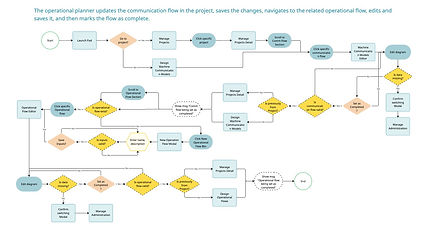
Operational Planner User Flow
Reframe the Structure
With clearer role boundaries, I reframed the information architecture around how users make decisions and move work forward, rather than around individual system functions.
By identifying common decision patterns across the three roles, I organized CDT into a shared structure that supports each role’s workflow while maintaining continuity from routing → operational planning → technical configuration → deployment.
Design direction: Build the IA around a shared production lifecycle, with role-specific workflows layered onto a consistent system structure.

User Decision Workflows

Sitemap
03 - Design for the End-to-End Workflow
Challenge 01
Design for Clarity Across Roles and Systems

EXPLORATION
Firstly, I standardized core interface structures—such as lists, editors, navigation, and hierarchy—to create a consistent visual framework across different parts of CDT.
DESIGN

Operational Flow List

Communication Flow List

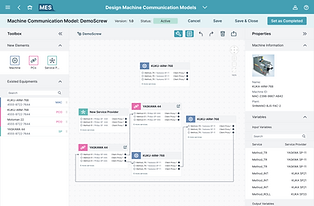
Operational Flow Editor
Communication Flow Editor

Message Flow List

Message Flow Editor
EXPLORATION
I established consistent patterns for common actions—such as create, edit, save, validate, and complete. For example, I standardized how users access and move between related workflows, whether from a project, the side navigation, or a flow list.
DESIGN
Navigate from flow list
Navigate from project
Navigate from side navigation bar
EXPLORATION
With consistent layouts and navigation patterns in place, I then addressed differences across roles by introducing progressive disclosure.
This ensures users only see the level of information relevant to their tasks—routing planners focus on high-level structures and relationships, operational planners work with expanded steps and connections, and technical engineers access detailed machine and message parameters on demand. This approach reduces cognitive overload while still preserving access to deeper system complexity when needed.

Drill via direct item click

Drill via item hover

Drill via breadcrumb

Drill via item's contextual menu
DECISION
Through workflow analysis and prototype reviews, I evaluated several ways for users to navigate complex production hierarchies, including item hover, contextual menus, breadcrumbs, and direct item click. The reviews showed that hover and contextual menus provided quick access, but were less discoverable and made the hierarchy harder to understand.
I ultimately combined direct item click for drill-down with breadcrumb navigation for drill-up. This created a more visible and predictable navigation model, allowing users to move through hierarchy levels while maintaining a clear sense of location and context.
The trade-off was between faster contextual shortcuts and a more discoverable, predictable hierarchy.
DESIGN
Final choice: direct item click + breadcrumb
Challenge 02
Design for Visibility When Things Go Wrong

EXPLORATION
A successful workflow was only part of the experience. I also explored what happens when validation, deployment, or machine-level execution fails—and how users across roles can recognize, trace, and diagnose those failures without jumping between disconnected views.
I addressed this challenge by designing for edge cases such as project activation and shop-floor deployment failures. I defined consistent failure states and behaviors across the system, using contextual modals to explain what went wrong and provide actionable guidance while highlighting affected elements directly in the project view.
This allows users to quickly locate and resolve straightforward issues without navigating away or losing context.
DESIGN

Modal with detailed guidance when activating failed

Error highlights when activating failed

Toast msg when deploying failed
EXPLORATION
But what if users need to preserve errors for further investigation? To move beyond temporary modals, I introduced a persistent error panel that surfaces detailed information, related nodes, and quick actions. This supports continuous debugging while allowing users to investigate issues without interrupting their workflow.
Building on the persistent error panel, I added a dependency layer that connects errors to related upstream and downstream flows. This brings previously fragmented information into one investigation context, helping users trace root causes and downstream impact without switching between multiple views.
Error panel from navigation bar
Error panel from tool bar

Error view via breadcrumb
DECISION
Through workflow analysis and prototype exploration, I evaluated three entry points for the contextual error panel: navigation bar, flow toolbar, and breadcrumb. The navigation bar felt too system-level for flow-specific analysis, while breadcrumbs lacked the space to represent multiple upstream and downstream relationships.
I ultimately surfaced the dependency view from the flow toolbar, keeping dependency analysis directly connected to the flow being investigated. This gives users a contextual way to trace relationships and understand the broader impact of an error without leaving their current workflow.
The trade-off was between making dependencies globally accessible and keeping investigation contextual to the affected flow.
EXPLORATION
Building on contextual error handling, I made errors visible at the project level, giving all roles a shared view of issues across routing, operational, and technical flows. A hierarchy view surfaces errors within their project context, allowing users to quickly see where problems occur and which parts of the workflow are affected, regardless of their role or current view.
DESIGN
Project-Level Error Visibility Layer
04 - Turning Complexity into a Story
Complexity belonged to the system,
not the user.
Design Specifications
At this stage, I established the visual foundation for the high-fidelity wireframes by defining the layout anatomy, spacing system, and design tokens to create consistency and clear hierarchy. I then developed the core component library, including buttons, cards, modal templates, and icon sets.


Hover to slide through
Central Design Time
I designed prototypes for Central Design Time, bringing the end-to-end production design workflow into one connected experience. The interface helps routing planners, operational planners, and technical engineers move from ERP-defined routings to operational flows, machine configuration, validation, and deployment with clearer context and less cross-system complexity.
1
Visual Flow, Zero Code
Transforms complex coding and logic into intuitive visual workflows.
2
See the Big Picture, Dive into Details
Introduces hierarchical navigation that allows users to easily drill up or down between different levels of flows and machines.
3
A Single Source of Truth
Unifies multi-system data into a single model and visual hierarchy for cross-role collaboration.
05 - The Outcome
Impact

Reflection
Design the System, Not Just the Screens
I learned to look beyond individual interfaces and design around the relationships between roles, workflows, and systems. Making those connections visible was essential to creating a coherent end-to-end experience.
Structure Complexity Instead of Removing It
Complex enterprise systems cannot simply be made “simple.” I learned to use information architecture, hierarchy, and consistent interaction patterns to make complexity understandable without sacrificing necessary system depth.
Explore Broadly, Then Make Intentional Trade-offs
Exploring multiple approaches to navigation, error handling, and workflow design helped me evaluate solutions against real system constraints. It strengthened my ability to make and communicate design decisions based on context, trade-offs, and user needs.
Disclaimer: The visuals in this case study are recreated simulations designed to demonstrate the design process and key improvements. Due to confidentiality agreements, no original content from the live product is shown.


